Pages crawl, video buffers, and the speed test shows half of what you pay for. Slow internet almost always has one main cause, and most of them take five minutes to find. The trick is checking in the right order instead of restarting the router ten times.
Step 1: Find where the problem is (5 minutes)
Run a speed test (Ookla Speedtest or M-Lab's test) and then go through this table.

12 reasons your internet is slow, and the fix for each
1. Weak Wi-Fi signal
Walls, floors, mirrors and fish tanks absorb Wi-Fi. If speed drops in one room, that's the reason.
Fix: move the router to a central, raised spot, away from the TV and metal. Use the 5 GHz band near the router and 2.4 GHz far from it. For big homes, a mesh system beats extenders.
2. Too many devices at once
Every phone, TV, console, camera and smart speaker takes a share. Netflix recommends 15 Mbps for one 4K stream and 5 Mbps for Full HD, while a game download takes everything it can get.
Fix: check the router app for active devices, pause big downloads, and set game consoles to download at night.
3. Something downloading in the background
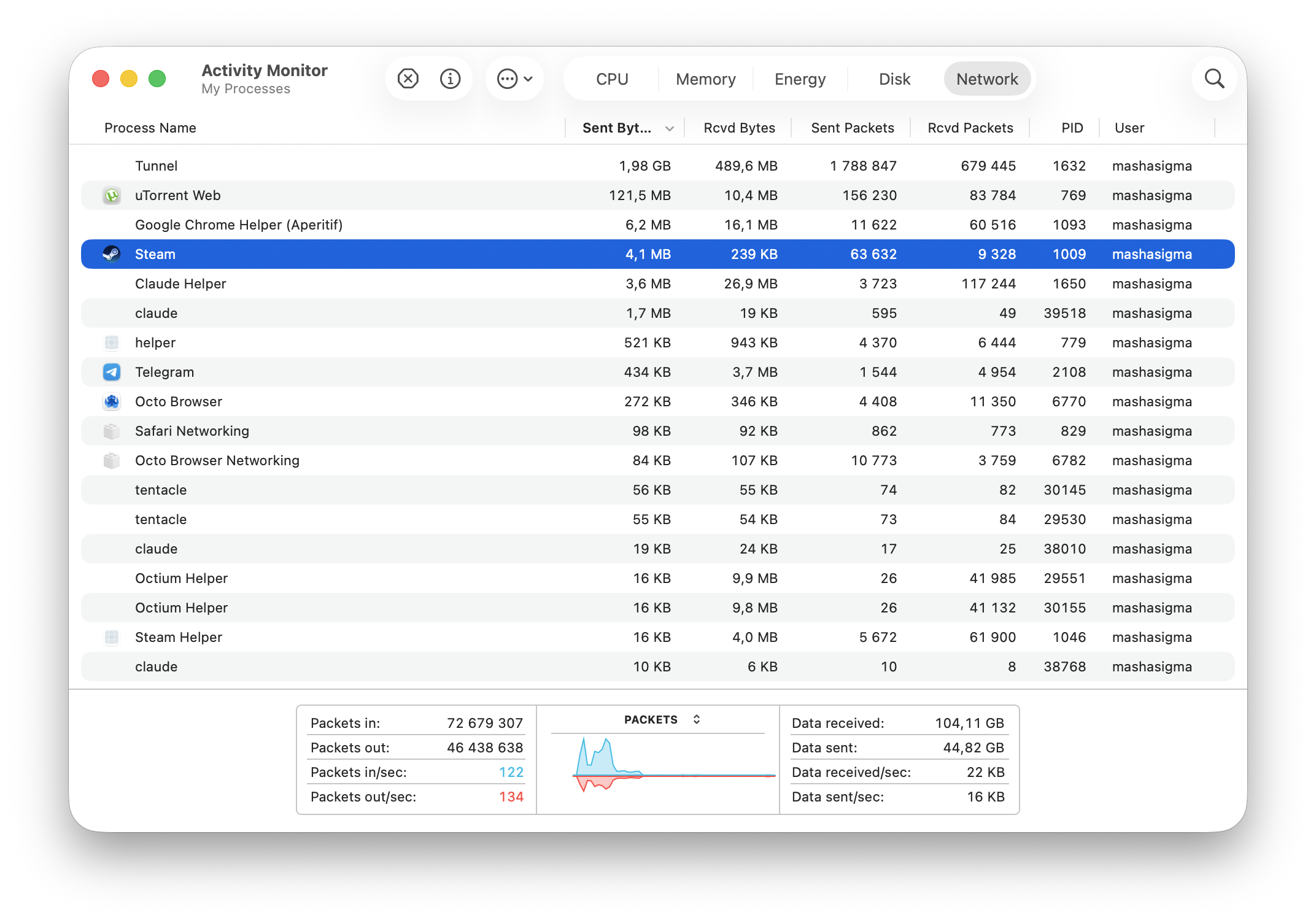
System updates, iCloud or Google Photos backups, OneDrive, Steam and game launchers often run silently.
Fix: on Windows, open Task Manager > Performance or the Processes tab sorted by network. On Mac, Activity Monitor > Network. Pause sync until you're done.
4. Your router needs a restart, or a replacement
Routers build up memory issues and overheat. Older models (Wi-Fi 4 / 802.11n) can't deliver the speed of a modern plan at all.
Fix: restart once (off for 30 seconds). If you need to do it every few days, update the firmware or replace the router. Wi-Fi 4 (802.11n) routers, still common in older homes, rarely deliver more than about 100-150 Mbps to a device in real rooms, so they hold back faster plans. Look for Wi-Fi 6 or newer.
5. Your provider's network is busy
Evening slowdowns between 7 and 11 p.m. that affect every device mean neighbors are online too and your provider's local network is overloaded.
Fix: keep a log of speed tests at different hours and send it to your provider. If it keeps happening, compare providers in your area.
6. Your plan is too small
A 100 Mbps plan is fine for one person and tight for a family that streams and games at the same time.
Fix: check what you actually pay for. US providers must show a standard broadband label with typical download and upload speeds, latency and price. Compare it with your tests.
7. High latency, not low speed
Speed is how much data moves per second. Latency (ping) is how long each trip takes. Video calls freeze and games lag with high ping even on a fast plan. A common reason is bufferbloat: the router queues too much data when someone uploads or downloads.
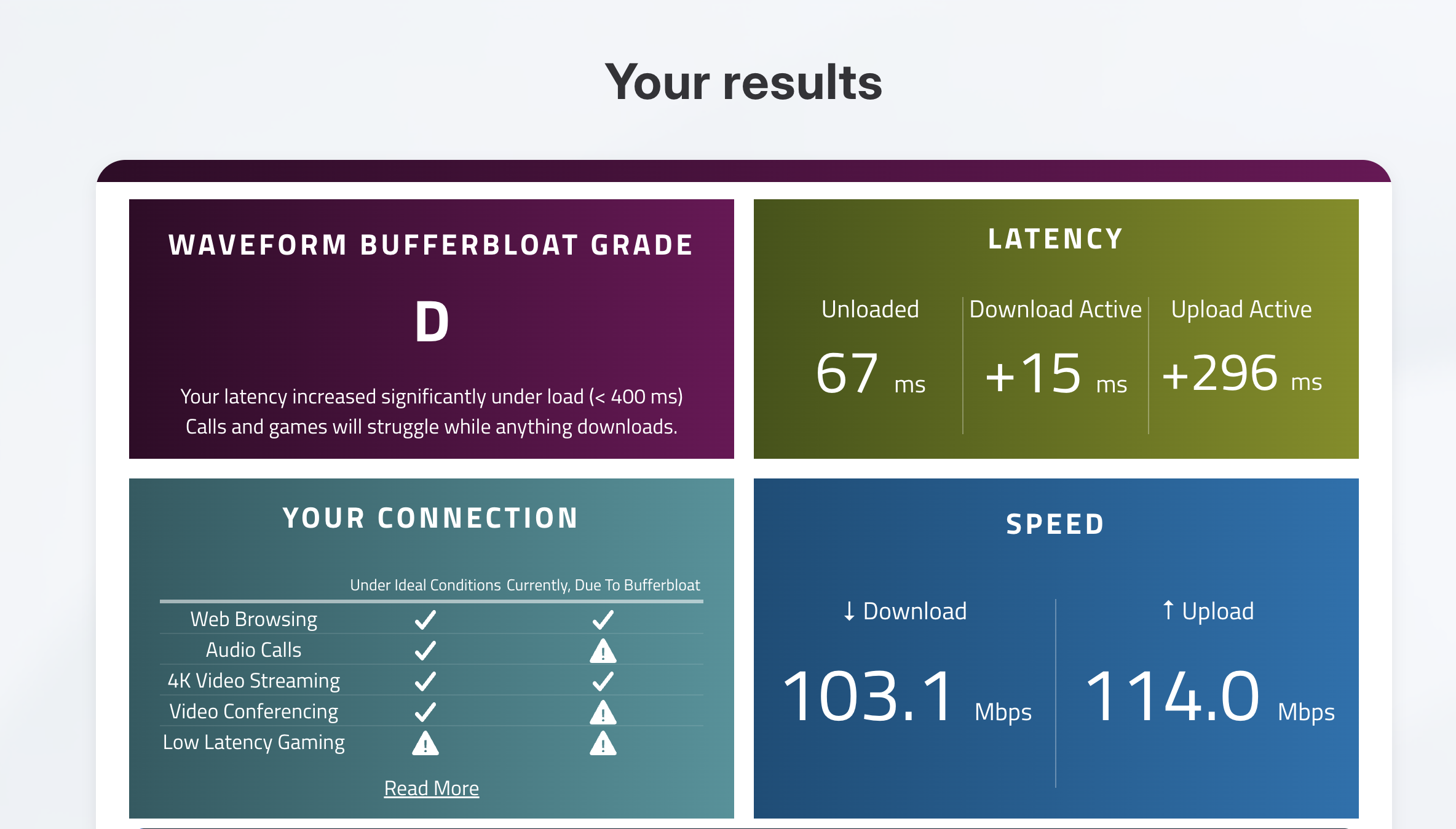
Fix: run a test that shows "loaded latency" or bufferbloat. If ping jumps under load, turn on SQM or QoS in your router settings, or limit upload-heavy apps.
8. Slow DNS
DNS turns site names into IP addresses. A slow DNS server from your provider makes every new page wait before it even starts loading.
Fix: switch to a public DNS like Cloudflare (1.1.1.1) or Google (8.8.8.8) in your router or device settings. If you then see "This network is blocking encrypted DNS traffic", here's what that means: This Network Is Blocking Encrypted DNS Traffic.

9. Damaged or old cables
Loose coax connectors and kinked Ethernet cables cut speed, and an old Cat5 cable (not Cat5e) is limited to 100 Mbps.
Fix: check every connection between the wall, the modem and the router. Replace old Ethernet cables with Cat6.
10. Malware or a browser extension
Microsoft's support page still lists spyware and viruses as frequent causes. Today it's more often a browser extension that injects ads or a crypto miner.
Fix: disable extensions one by one and run your system's security scan.
11. A VPN on a far-away server
A VPN adds an extra stop. If the server is on another continent or overloaded, everything slows down.
Fix: connect to a server near you, and use the WireGuard protocol, which is usually faster than OpenVPN: WireGuard vs OpenVPN vs IKEv2. If speed is still low, test without the VPN to compare.
12. Your provider is throttling you
Throttling means the provider slows your connection on purpose: after you pass a data cap, on "unlimited" mobile plans when the network is busy, or for specific traffic like video streaming. In the US there are currently no federal net neutrality rules: a federal appeals court struck down the FCC's 2024 rules in January 2025. Providers still have to disclose how they manage their network, which is what the broadband label links to, and a few states have their own rules.
How to check is the next section.
Why is my Wi-Fi so slow but my internet fine?
If a cable connection to the router is fast and Wi-Fi is slow, your plan and provider are fine. The Wi-Fi is the problem:
- Distance and walls: test right next to the router. If it's fast there, it's signal.
- Crowded channels: in apartments, dozens of networks share the same channels. Let the router pick the channel automatically or switch to a less crowded one using a Wi-Fi analyzer app.
- 2.4 GHz only: older devices and some routers default to 2.4 GHz, which tops out far below most plans. Use 5 GHz when you're close.
- Old device: a five-year-old laptop or phone may not support newer Wi-Fi standards.
- Someone else on your Wi-Fi: check the device list in your router app and change the password if you see strangers.
How to tell if your provider is throttling you
Providers usually throttle by type of traffic (video, downloads, torrents), not your whole connection. That's why speed tests can look fine while Netflix buffers. Speed test sites are also easy for a provider to recognize.
A VPN hides what kind of traffic you're sending, so the provider can't slow down one type. That makes it a simple test:
What the result means:
- Faster with the VPN: your provider is likely slowing that type of traffic. Keep the VPN on for it, and check your plan terms.
- Same speed: no traffic-specific throttling. The cause is elsewhere in the list above.
- Slower with the VPN: normal VPN overhead. Not throttling.
An honest note, since we make a VPN: for 11 of the 12 causes above, a VPN won't help, and it adds a little overhead of its own. It's worth it only for the last one. If the test shows your provider slows video or downloads, keeping a VPN on for those is the simplest fix you control.
Atomic VPN works for this test because it uses WireGuard by default, which keeps the overhead small (the site states 890 Mbps on a 1 Gbps line in our own tests), and you can pick a server in your own city or region. How to set it up.
When to call your provider
Call if all three are true:
- Speeds are low on a cable connection, not only Wi-Fi.
- It happens at different times of day, not only in the evening.
- You've restarted the modem and router and checked cables.
Have your speed test results ready, with dates and times. Ask whether there's an outage, whether your modem is supported for your plan, and whether a technician can check the line signal.
FAQ
Why is my internet so slow all of a sudden?
Usually a background download or update, an outage in your area, a router that needs a restart, or many devices online at once. Check your provider's outage page and restart the router first.
How do I find out what is slowing down my internet?
Run a speed test on two devices, then on a cable connection. One slow device points to that device, slow Wi-Fi only points to the router, and slow cable points to your provider or modem.
Why is my internet slow at night?
Your provider's local network is busy when neighbors stream and game. If evening speeds stay far below your plan, log the tests and contact your provider.
Can a VPN make my internet faster?
Only when your provider throttles a specific type of traffic, because the VPN hides it. Otherwise a VPN adds a little overhead. Choose a nearby server and WireGuard for the best speed.
How do I know if my internet is being throttled?
Compare the same video or download with and without a VPN at the same time of day. If it's clearly faster through the VPN, your provider is probably slowing that traffic.
What internet speed do I need?
Add up what runs at the same time. Netflix suggests 5 Mbps per Full HD stream and 15 Mbps per 4K stream, so two 4K TVs and a video call already need about 40 Mbps with no headroom. A household that also downloads games is more comfortable with 300 Mbps or more. Upload speed matters for calls and streaming yourself.