
Tor and a VPN can both hide your original IP address from the websites you visit, which is why they are often treated as competing versions of the same privacy tool. Their underlying designs are very different, though, and those differences affect how much anonymity they can provide, how fast they feel and whether they make sense for everyday internet use.
A VPN creates an encrypted connection between your device and a server operated by the VPN provider. Tor instead distributes the route across several independent relays, so no single relay is intended to know both where the connection started and where it ultimately went. The result is a different trade-off. Tor puts more emphasis on anonymity, while a VPN is usually easier to keep enabled for normal browsing, apps and other daily activity.
The right choice therefore depends less on which technology sounds more private and more on what you are trying to protect. Someone who wants a private everyday connection has different requirements from someone who wants to make it difficult to associate their network identity with the websites they visit.
How Tor works
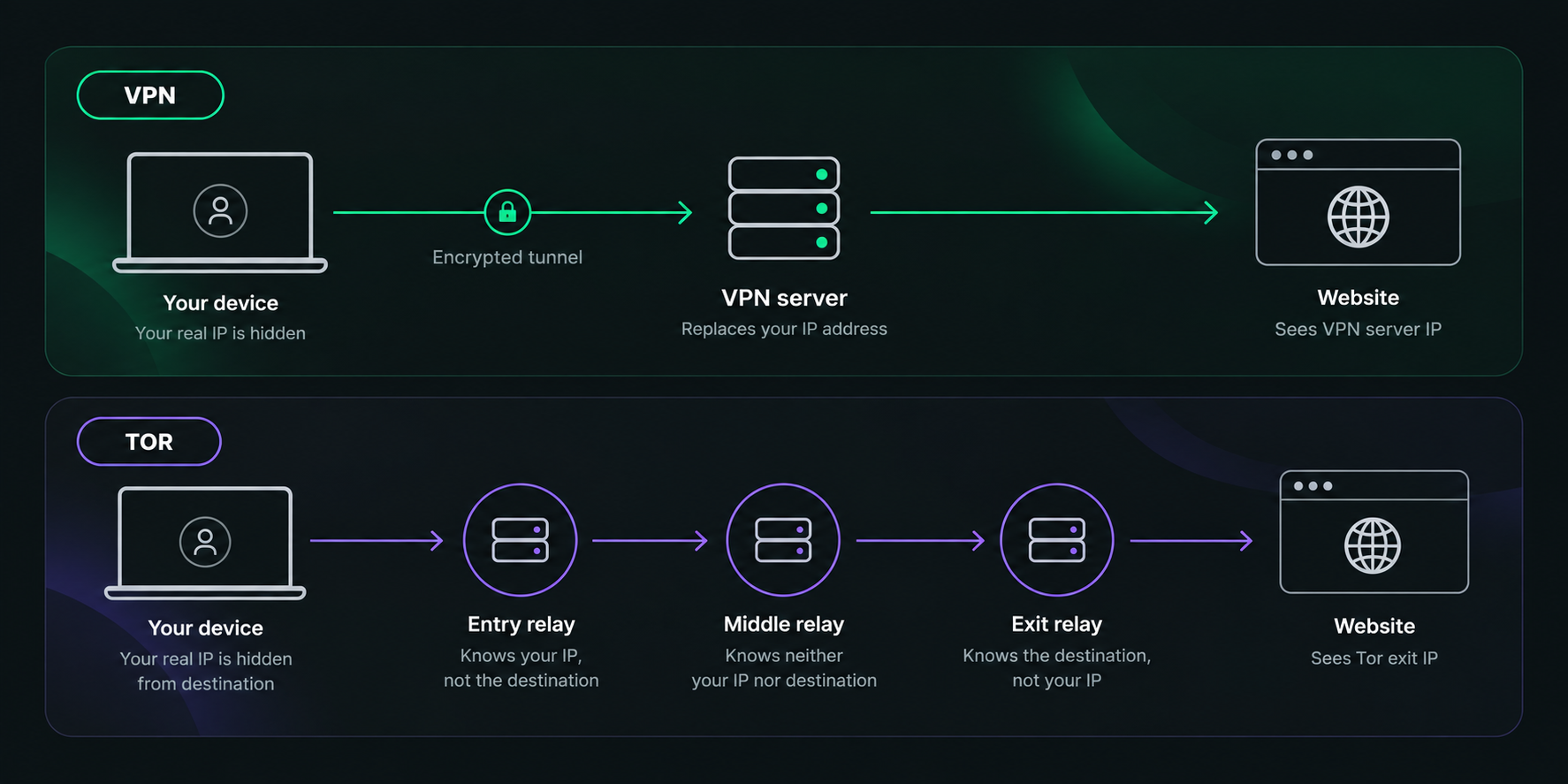
Tor routes browsing traffic through a chain of relays rather than sending it directly to the destination. The Tor Project’s explanation of Tor Browser describes a standard circuit as a route through multiple Tor relays before traffic reaches the public internet. Websites consequently see the connection coming from the Tor network rather than directly from your normal IP address.
The important part is how information about the route is separated. An entry relay handles the beginning of the circuit, while an exit relay makes the final connection to an ordinary website. Because these responsibilities are distributed, a single relay is not supposed to receive both your original network identity and the final destination.
Tor Browser adds another layer to that model. It is based on Firefox but has been modified specifically to resist tracking and browser fingerprinting, which is why the Tor Project strongly discourages simply routing a normal browser through Tor. A regular browser can still expose identifying information through its configuration, persistent storage or other browser-level signals. Tor’s guidance on using other browsers explains these risks in more detail.
How a VPN works
A VPN takes a more direct approach. Your device establishes an encrypted tunnel to a VPN server, and internet traffic routed through that tunnel continues from the server to its destination. Websites normally see the server’s IP address rather than your original public IP.
This moves trust rather than distributing it. Your internet provider no longer has the same direct visibility into the destinations carried inside the VPN tunnel, but the VPN company operates the server handling the connection. That makes the provider’s infrastructure and data practices an important part of the privacy decision.
For example, Atomic VPN’s Privacy Policy says the service does not retain browsing history, DNS queries, originating IP addresses or network-side connection logs. Its current product information also lists WireGuard, OpenVPN and IKEv2/IPsec among the protocols available through the service.
A VPN also fits into a normal device more transparently than Tor Browser. Instead of moving all private browsing into a dedicated browser, the VPN can carry traffic from multiple supported applications through the same connection.
Tor vs VPN at a glance
Tor and VPNs overlap most clearly at the IP layer. Both can prevent an ordinary website from seeing the public IP address associated with your home, mobile or office connection. What replaces that IP and how the traffic reaches it are different.
With a VPN, the site sees the address of the VPN server you selected. With Tor, it normally sees the exit relay at the end of the Tor circuit. That distinction is important because a VPN generally gives you deliberate control over the server location, while Tor builds circuits around its anonymity model rather than acting as a conventional location selector.
Their coverage is different as well. Tor Browser primarily protects activity sent through Tor Browser, while a system VPN can protect traffic from several applications at once. The Tor Project explicitly notes that Tor only protects applications configured to send their traffic through Tor, which is one reason Tor Browser and a VPN should not be treated as interchangeable products.
Is Tor more private than a VPN?
Tor has a structural privacy advantage when the goal is to reduce the ability of one intermediary to connect your identity with your destination. Because traffic is distributed across several relays, the system is designed around separation of knowledge rather than trust in one provider.
A conventional VPN uses a centralized model. The VPN server receives the connection from your device and forwards traffic toward the destination, so the provider sits in a more important position in the route. A strong privacy policy can limit what is retained, but it does not change the fact that the network architecture has one primary intermediary.
That does not make Tor a guarantee of anonymity. The Tor Project’s own safety guidance makes clear that Tor Browser cannot provide perfect anonymity if the user reveals identifying information. If you sign into a personal account or enter your name and email into a form, the website can still know who you are even though it does not see your normal IP address.
The practical distinction is therefore about the threat model. Tor is designed for situations where separating the source of a connection from its destination matters. A VPN is designed more around giving normal internet traffic an encrypted intermediary and replacing the public IP that websites see.
Tor Browser provides privacy beyond the IP address
An IP address is only one of many signals websites can use to recognize visitors. Browser configuration, cookies and other persistent identifiers can continue to link activity even after the visible IP changes.
Tor Browser addresses some of these problems at the browser level. The Tor Project describes protections against tracking and fingerprinting as a core part of Tor Browser, rather than relying on the Tor network alone. This is an important reason why using Tor through a standard browser is not equivalent to using Tor Browser.
A VPN normally leaves your browser environment unchanged. It alters the network path, but your existing cookies, accounts and browser settings remain available to websites. This is not a flaw in the VPN model; it simply means a VPN is solving a different layer of the privacy problem.
Is a VPN faster than Tor?
In most normal situations, a VPN will be faster because its route is much simpler. Traffic usually travels from your device to one VPN server and then onward to the destination, while Tor sends it through several relays operated across the Tor network.
The Tor Project explains that Tor Browser can feel slower because traffic passes through relays around the world and performance depends on network load and latency. That overhead is a consequence of Tor’s architecture rather than an accidental limitation.
A VPN can still reduce performance, particularly when the selected server is far away or congested, but there are fewer additional hops. That makes VPNs much more practical when the connection needs stable bandwidth or low latency, including video calls, downloads and other everyday activities.
The comparison is therefore not simply that one technology is fast and the other is slow. Tor accepts additional routing complexity because privacy against traffic correlation is more central to its design.
Tor vs VPN for everyday browsing
For ordinary browsing, a VPN is usually easier to fit into an existing routine. Once connected, you can continue using your normal browser and other applications while the VPN handles the network connection underneath them.
Tor changes the browsing environment more deliberately. To receive the privacy properties Tor Browser is designed to provide, it is better to browse inside Tor Browser instead of treating Tor as a background network switch. The Tor Project warns that other browsers can expose details such as operating-system information or persistent tracking data even if their traffic has been routed through the Tor network.
This makes Tor a strong option when anonymity is important enough to justify a specialized workflow. For someone who mainly wants a more private connection during normal browsing, the VPN model involves fewer changes to how the device is used.
Tor vs VPN on public Wi-Fi
Public Wi-Fi is a good example of where the VPN approach is particularly convenient. A VPN creates an encrypted connection from the device to the VPN server, reducing what the local network can observe about traffic carried inside that tunnel.
Tor also protects browsing destinations from the local network when traffic is properly sent through Tor, but it does not automatically cover every application on the device. The Tor Project’s safety documentation emphasizes that Tor only protects software configured to use the network.
For a laptop connected to a hotel, airport or café network, that difference matters. A VPN can protect normal application traffic through one connection, whereas Tor is better understood as a privacy environment for the applications specifically configured to use it.
Tor vs VPN for hiding your IP address
If the only goal is to hide your original IP address from the websites you visit, both technologies can do it. The difference lies in what address appears instead and how much control you have over it.
A VPN replaces your visible address with the IP assigned to the selected VPN server. Commercial VPN services usually let users choose a country or region directly, so the network location becomes an intentional part of the connection.
Tor websites instead see the address of the exit relay. Tor may make your traffic appear to come from another country, but geographic selection is not the central purpose of the system. Its routing model is built around anonymity rather than convenient switching between national server locations.
That is why Tor should not be thought of simply as a free VPN. Hiding the source IP is a shared capability, but the two systems are optimizing for different outcomes.
Can your ISP see that you are using Tor or a VPN?
Neither tool should be confused with making the privacy connection itself invisible. An internet provider can normally tell that a device has established a connection to VPN infrastructure or to the Tor network, even though the destinations carried through that privacy layer are no longer exposed in the same way as a direct connection.
Tor also offers mechanisms intended for environments where direct Tor access is restricted. Those are part of Tor’s censorship-resistance infrastructure rather than a feature of a conventional VPN connection.
This distinction matters because hiding the destination and hiding the use of a privacy tool are separate problems. Tor and VPNs address the first much more directly than the second.
Can websites detect Tor or VPN traffic?
A website can often recognize that a connection is coming from a privacy service even if it cannot see the original IP behind it. Tor exit relays are publicly identifiable, while commercial VPN addresses can be classified through hosting and network databases.
The result can be additional verification, CAPTCHAs or restrictions from services that treat shared or privacy-network addresses differently. This does not necessarily mean the IP-hiding function has failed. The website can know that a Tor exit or VPN server is being used without knowing which subscriber is behind it.
That difference is important when evaluating privacy claims. Hiding the original address and disguising the use of a VPN or Tor are not the same capability.
Can Tor change your country like a VPN?
Tor can change the geographic location associated with the IP address a website sees, but it does not offer the same straightforward country-selection experience as most VPNs.
VPN apps usually expose a list of countries or servers and allow the user to select the required location directly. That is useful when the goal is to obtain a British, US or other regional IP address while keeping a regular internet connection.
Tor circuits are constructed according to Tor’s routing logic. Although advanced configuration can influence exit locations, that is not the main purpose of the system and it should not be treated as a normal country-switching interface.
For travel and other use cases where predictable server location matters, a VPN therefore makes more sense. Tor’s location changes are secondary to the anonymity properties of its route.
Tor vs VPN for streaming
Streaming is much closer to the kind of traffic a VPN is designed to handle. Tor’s extra relays create more latency and rely on capacity shared across a volunteer-operated network, making high-bandwidth entertainment a poor fit for the system.
A VPN has a shorter route and usually offers deliberate server selection, which is more practical for ordinary video traffic. Whether a particular service accepts connections from a VPN is controlled by that service and can change independently of the VPN itself.
The difference follows the broader pattern of the comparison. Tor spends additional network resources to achieve its anonymity model, while a VPN is intended to preserve more of the performance characteristics people expect from a regular internet connection.
Tor vs VPN for torrenting
Tor should not be used as a BitTorrent privacy layer. The Tor Project specifically advises against torrenting through Torbecause torrent clients can expose a user’s real IP address and because high-volume torrent traffic creates additional load for the volunteer network.
A VPN is much better suited to P2P when the provider permits that traffic. Atomic VPN, for example, currently states that P2P traffic is allowed across its network. Atomic VPN’s current product information lists P2P support alongside its server network.
As with any P2P use, the VPN does not change the legal status of the files being transferred. It changes the network route and public IP address, not the underlying rules governing the content.
Can you use Tor and a VPN together?
It is technically possible to combine a VPN with Tor, but doing so is not automatically a privacy upgrade. Adding another layer also adds another network relationship and more opportunities for the setup to behave differently from what the user expects.
The Tor Project says it does not generally recommend using Tor together with a VPN unless the person understands how both technologies are configured. An incorrect combination can reduce anonymity or interfere with protections Tor normally provides.
For most users, it is more useful to identify the problem first. If the goal is normal device-wide privacy and location control, a VPN already addresses that use case. If Tor’s distributed anonymity model is required, adding a VPN should be a deliberate decision based on a specific threat model rather than an assumption that two privacy tools must always be better than one.
What are onion services?
One major capability a normal VPN does not replace is access to onion services. These use .onion addresses and are available through the Tor network rather than the ordinary public web.
The Tor Project explains that onion services can hide the service’s location and keep traffic between the visitor and the service inside Tor with end-to-end encryption. This allows both sides of the connection to benefit from privacy properties that an ordinary public website does not have.
If accessing onion services is part of the requirement, Tor has a function that a conventional VPN cannot reproduce. For normal websites, however, the decision remains more dependent on whether you need Tor’s anonymity architecture or the convenience of a VPN.
Does Tor make you anonymous?
Tor significantly changes what websites and network observers can learn from the connection, but it cannot prevent users from identifying themselves through their own actions.
The Tor Project’s recommendations for using Tor Browser safely point out that signing into an account or providing personal information means the website can still know who you are. The network can hide the connection’s original location without erasing the identity attached to the account.
This is also why anonymity cannot be reduced to a hidden IP address. Accounts, browser behavior and information voluntarily shared with websites all remain relevant. Tor provides tools designed to reduce several of those signals, but user behavior still matters.
The same principle applies to a VPN. A different IP address does not log you out of Google, remove your cookies or prevent a service from recognizing the account you deliberately sign into.
When Tor makes more sense
Tor is a better fit when separating your original network identity from the websites you visit is important enough to justify a specialized browser and a more complex route. Its architecture reduces reliance on one trusted network provider and combines that routing model with browser-level protections intended to make tracking more difficult.
It is also the natural choice when you need onion services. Because those services exist inside the Tor ecosystem, a conventional VPN cannot provide the same functionality simply by changing your public IP address.
The cost is convenience and performance. Tor is not designed to provide the fastest possible connection or to behave like a country selector for every application installed on a device.
When a VPN makes more sense
A VPN is better suited to people who want privacy to work in the background while they continue using the internet normally. It can protect traffic from multiple supported applications, replace the public IP that ordinary websites see and provide predictable server-location selection without requiring a dedicated browser environment.
That makes it practical on public Wi-Fi, while travelling and whenever the goal is to keep a normal internet workflow while adding an encrypted intermediary. The important trade-off is that the VPN provider becomes a trusted part of the connection, so its policies should be examined rather than assumed.
For example, Atomic VPN’s privacy documentation describes what account information is retained separately from network activity and what VPN-side data is not recorded. The service also publishes its available protocols and network information on the Atomic VPN homepage.
Tor or VPN: which should you choose?
Tor and VPNs solve some of the same visible problems, but they reach those results through different systems. Both can stop ordinary websites from seeing your original public IP, and both can reduce what the local network can observe about protected traffic.
Tor goes further in separating knowledge of the source and destination across multiple relays. Combined with Tor Browser’s tracking protections, that makes it the stronger fit when anonymity is the central requirement and the user accepts the additional performance and usability trade-offs.
A VPN gives up that distributed architecture in exchange for a simpler connection that integrates with normal applications, supports deliberate location selection and is generally better suited to everyday traffic. Its privacy model depends more heavily on the provider, which is why logging practices and technical policies matter.
For normal day-to-day privacy, a VPN is usually the more convenient tool. When anonymity is the priority and a specialized browsing environment is acceptable, Tor provides protections that a conventional VPN is not designed to replicate. Neither one makes accounts, cookies or information you share with websites disappear, so the best choice is the one that fits the privacy problem you are trying to solve.
.png)
.png)






