Your battery dies by lunch, an app you don't remember installing shows up, and a friend says you sent them a weird link. It's easy to jump to "I've been hacked". Sometimes that's right. More often it's an old battery, an ad-heavy app or a hacked account, not a hacked phone.
This guide helps you tell the difference, check your iPhone or Android step by step and fix what you find.
Hacked phone, hacked account or just an old phone?
Before checking anything, figure out which problem you have. They have different fixes.
The last two rows are the classic "signs" in every article, and on their own they rarely mean a hack. Treat them as a reason to look, not as proof.
9 signs your phone may actually be hacked
1. Apps you didn't install
Open your full app list (not just the home screen) and look for anything you don't recognize, especially apps with generic names like "System Service", "Device Health" or "Sync". Stalkerware often hides behind boring names.
2. A device management or configuration profile you didn't add
This one is easy to miss and serious if you find it. A profile can route your traffic, install certificates and control settings.
- iPhone: Settings > General > VPN & Device Management. If you see a profile you didn't add and it isn't from your employer or school, remove it.

- Android: Settings > Security & privacy > More security settings > Device admin apps. Only apps like Find My Device should be there.
3. Apps with accessibility access they don't need
Accessibility permissions let an app read your screen and tap for you. Banking trojans on Android rely on them.
- Android: Settings > Accessibility > Installed apps (or Downloaded apps). Anything here you don't use, turn off and uninstall.
4. Logins and devices you don't recognize
Check your main accounts for active sessions:
- Apple Account: Settings > [your name] > scroll to the device list.
- Google: myaccount.google.com > Security > Your devices.
- WhatsApp: Settings > Linked devices. Instagram and Facebook: Accounts Center > Password and security > Where you're logged in.
An unknown WhatsApp Web session explains "someone is reading my messages" more often than spyware does.
5. Sudden loss of mobile service
If your phone suddenly shows no service and you start getting "your SIM was changed" emails, someone may have moved your number to their SIM (a SIM swap). With your number, they can receive your login codes. Call your carrier right away from another phone. The FCC explains SIM swapping and what carriers must do.
6. Pop-ups and redirects outside the browser
Full-screen ads on the home screen or the lock screen, or your browser opening sites by itself, point to adware. It's annoying and sometimes leads to scam pages, but it's a different thing from someone spying on you.
7. Settings that change on their own
Location turned on, a new keyboard installed, Find My turned off, or security updates paused. Hackers and stalkerware switch these to keep access.
8. Messages or calls you didn't make
Check your sent texts and call history for messages to unknown numbers, especially premium short codes. Some Android malware sends paid SMS.
9. Someone knows things they shouldn't
If a partner, ex or family member knows your location, your texts or your search history, the cause is often closer than a hacker: shared Apple ID or Google account, Family Sharing, location sharing, or stalkerware installed by someone who had your phone for a few minutes.
Do "secret codes" show if your phone is hacked?
No. This is the most repeated myth on the topic, mostly from short videos.

These are standard network codes for call forwarding. They can reveal one specific trick, someone forwarding your calls to their number, which is worth checking. They don't scan for malware, spyware or hacked accounts, and a "clean" result doesn't mean the phone is clean. On some US carriers the codes don't work at all.
How to check if your iPhone is hacked
- Update iOS: Settings > General > Software Update. Most real iPhone attacks use bugs that updates already fix.
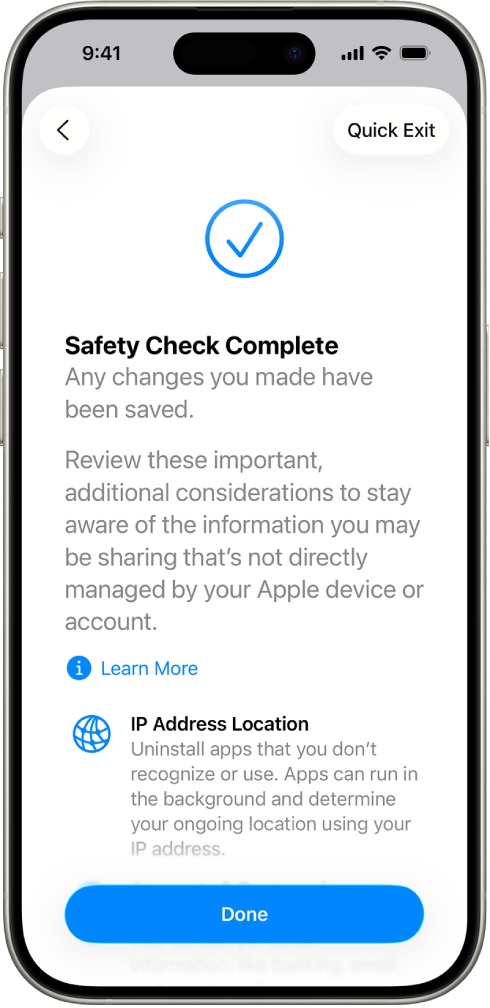
- Run Safety Check: Settings > Privacy & Security > Safety Check. It shows who you share location and data with, which apps have access and which devices are signed in. Apple built it for people who worry someone close is watching. Apple's guide explains every step.
- Check profiles: Settings > General > VPN & Device Management.
- Check your Apple Account devices and remove anything you don't own.
- Check location sharing: Find My app > People.
- If you're at high risk (journalist, activist, abuse situation), turn on Lockdown Mode: Settings > Privacy & Security > Lockdown Mode.
An iPhone that isn't jailbroken can't install apps outside the App Store in most countries, so iPhone spyware usually means a hacked iCloud account, a profile, or very expensive targeted attacks that ordinary people don't face.
How to check if your Android phone is hacked
- Update Android and Google Play system updates: Settings > Security & privacy > Updates.
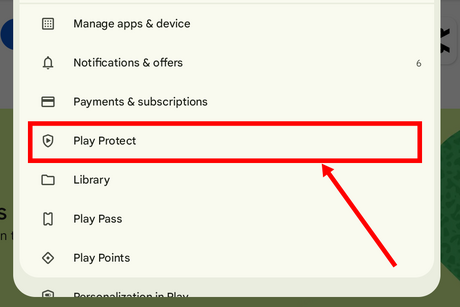
- Run Play Protect: Play Store > profile icon > Play Protect > Scan. Google's help page explains what it checks.
- Check device admin apps and accessibility (signs 2 and 3 above).
- Check "Install unknown apps": Settings > Apps > Special app access > Install unknown apps. Turn it off for every app you didn't mean to allow.
- Look at battery and data usage by app: an unknown app near the top is a red flag.
- Check your Google account devices at myaccount.google.com.
What to do if your phone is hacked
Do these in order:
- Disconnect. Turn on airplane mode while you work, then reconnect only to a network you trust.
- Remove what you found. Delete unknown apps, profiles, admin apps and accessibility permissions.
- Update the system.
- Change passwords from a different, clean device. Start with your email (it can reset everything else), then Apple or Google, banking and social media.
- Turn on two-factor authentication with an authenticator app or passkeys, not SMS where possible.
- Sign out of all other sessions in each account.
- Call your carrier if you suspect a SIM swap and ask for a SIM lock or port-out PIN.
- Factory reset if signs remain. Back up photos and contacts, not apps or settings, then restore only what you need.
One exception: if you think someone you know installed stalkerware, removing it can alert them. If you're in an abusive situation, contact a support service first. The Coalition Against Stalkerware has guidance and hotlines, and keeping evidence may matter.
How to keep your phone from getting hacked again
The FTC's advice covers the basics: lock your phone with at least a 6-digit passcode, turn on automatic updates, back up regularly and set up the lost-phone feature. Add a few habits:
- Install apps only from the App Store or Google Play, and read the permissions.
- Don't open links from strangers. Even when a link doesn't infect your phone, it can reveal your IP and device to the sender. We explain how in What Is Grabify?
- Never type your Apple or Google password on a page you reached from a text message.
- Be careful on public Wi-Fi. Fake hotspots at hotels and airports can show you fake login pages. Use your mobile data or a VPN there. More in Is Hotel Wi-Fi Safe?
- Don't leave your phone unlocked with people you don't fully trust. Most stalkerware is installed by hand.
What a VPN does and doesn't do here
A VPN encrypts your traffic between the phone and the VPN server. That protects you on public Wi-Fi, hides the sites you visit from the network owner and keeps your real IP away from links and apps. It does not remove malware, stop stalkerware already installed or protect an account whose password was stolen. Think of it as one layer, next to updates and two-factor authentication.
Atomic VPN runs on Android, Windows and macOS (iOS coming soon), uses WireGuard by default and keeps no activity logs. How to set it up.
FAQ
What is the code to check if my phone is hacked?
There isn't one. *#21# and *#62# show call forwarding settings, and ##002# turns forwarding off. They can reveal forwarded calls, but they don't detect malware or spyware.
Can someone hack my phone just by calling or texting me?
For ordinary people, almost never. Zero-click attacks exist, but they target journalists and officials and cost a lot. The usual risk is a text with a link that asks you to log in or install something.
Can you remove a hacker from your phone?
Usually yes: remove unknown apps and profiles, update the phone, change passwords from another device and sign out of all sessions. If signs remain, back up your photos and do a factory reset.
How do I know if my phone is being monitored by someone?
Look for apps you didn't install, device management profiles, accessibility or admin permissions you didn't grant, and location sharing you didn't turn on. On iPhone, Safety Check shows all of this in one place.
Can an iPhone get hacked?
Yes, but rarely through apps. Most iPhone "hacks" are hacked iCloud accounts, shared Apple IDs, malicious profiles or phishing. Keeping iOS updated closes most of the rest.
Does a factory reset remove hackers?
A reset removes apps, profiles and malware on the device. It doesn't fix hacked accounts, so change passwords and turn on two-factor authentication too, or the attacker can get back in.