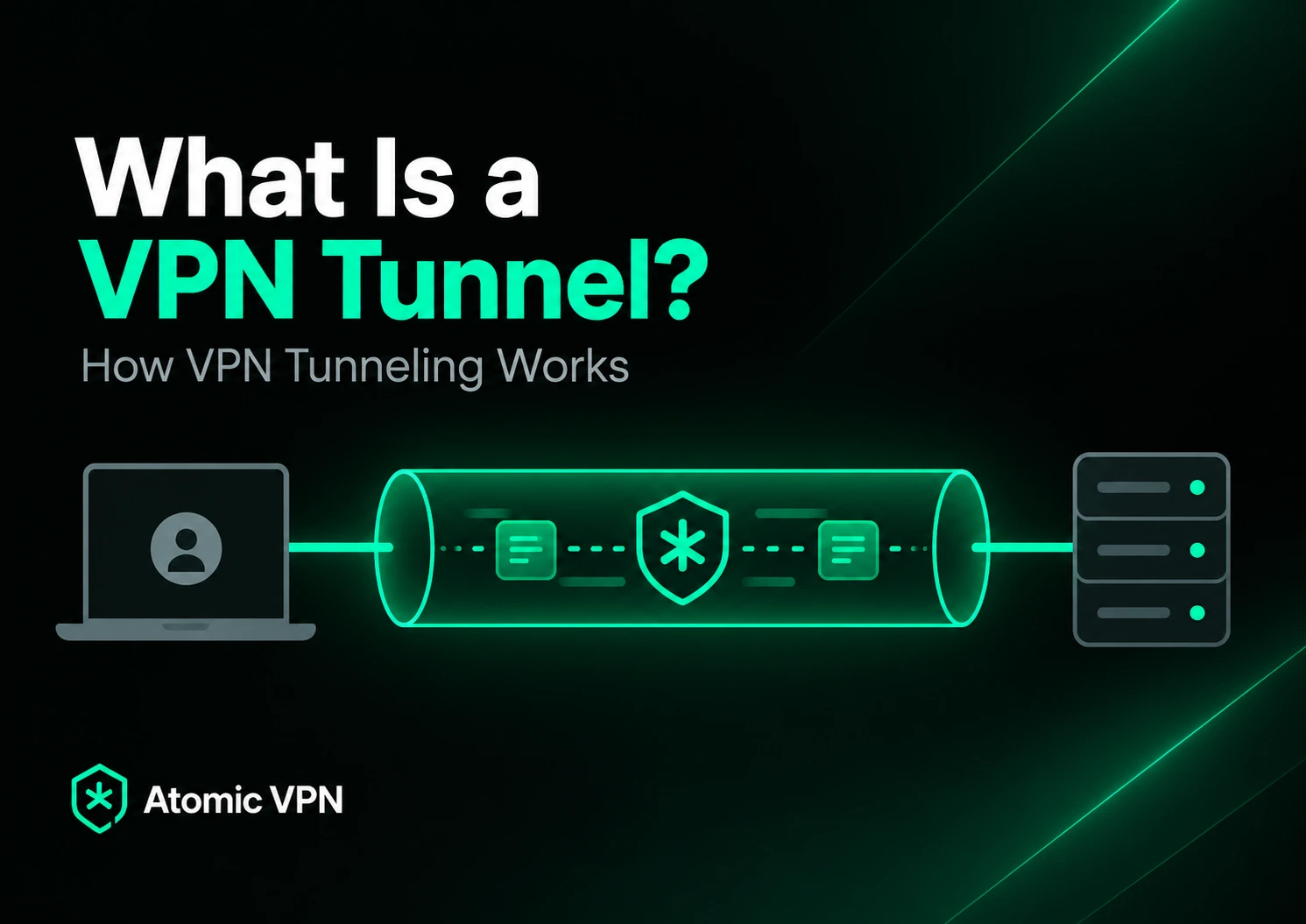
A VPN tunnel is the protected connection that carries traffic between your device and a VPN server. When you connect to a VPN, your internet traffic is no longer sent directly toward each website or online service. The VPN client first processes the traffic, sends it through the tunnel to a VPN server, and the server then forwards it toward its destination.
The word “tunnel” is a useful metaphor, but there is no separate physical cable or hidden route through the internet. A VPN tunnel is created through networking protocols that encapsulate traffic and, in modern consumer VPNs, encrypt it so networks between the two VPN endpoints cannot simply inspect the protected data.
This tunnel is the mechanism behind many of the changes people associate with a VPN. It allows websites to see the VPN server’s public IP instead of your normal one and reduces what the local network or internet provider can observe about the individual connections carried inside the tunnel.
What is a VPN tunnel?
A VPN tunnel is a logical connection between two VPN endpoints that carries network traffic inside another protected connection. For a typical consumer VPN, one endpoint is your phone, computer or router and the other is a VPN server.
Traffic generated by your apps is processed by the VPN client before it leaves the device. The resulting VPN packets travel across the internet to the server, where the VPN layer is removed and the underlying traffic continues toward the website or service you requested.
This process is known as tunneling because one type of network traffic is carried inside another. The IPsec architecture defined in RFC 4301 describes tunnel mode as a way to protect an original IP packet by carrying it inside a new IP packet between security endpoints.
A VPN tunnel therefore provides the protected path used by the connection, while the VPN protocol determines how that path is created, secured and maintained.
How does a VPN tunnel work?
A VPN tunnel begins when the VPN client establishes a connection with a VPN server. Before normal internet traffic starts moving through it, the two endpoints negotiate the information required to authenticate and protect the session.
Once the tunnel is established, traffic leaving your device is directed toward the VPN interface rather than sent directly to its final internet destination. The VPN protocol encapsulates that traffic, protects the packet contents and sends the resulting packets toward the VPN server.
WireGuard, for example, uses a cryptographic handshake to establish session keys before encrypted network packets begin moving between peers. Other VPN protocols achieve the same general result through different connection, authentication and key-management mechanisms.
The VPN server receives the protected traffic, verifies it, removes the VPN layer and forwards the original request toward its destination. Replies follow the reverse route, returning to the VPN server before being carried back through the tunnel to your device.
What happens to your data inside a VPN tunnel?
Several processes work together when traffic enters a VPN tunnel. The exact implementation varies between protocols, but the basic idea remains consistent.
First, the original traffic is encapsulated. The VPN protocol packages network data into the format it uses to communicate between the client and server, allowing ordinary application traffic to travel inside the VPN connection.
Modern VPN protocols also encrypt the protected portion of that traffic. Someone observing the network between your device and the VPN server can still see packets moving, but they cannot simply open those encrypted packets and read the protected contents.
Authentication is equally important because the VPN endpoints need a secure way to establish that they are communicating with the intended peer. Integrity protection also helps detect traffic that has been modified before reaching the other end of the tunnel.
When the protected packets reach the VPN server, the VPN layer is removed and the original traffic continues toward its destination. The destination therefore receives the connection from the VPN server rather than directly from your normal public IP address.
Where does a VPN tunnel start and end?
For a normal VPN application, the tunnel starts on the device running the VPN client and ends at the selected VPN server. Your router and ISP still transport the packets, but they sit between the tunnel endpoints rather than becoming part of the protected session themselves.
Consider a laptop connected to home Wi-Fi. Without a VPN, its traffic passes through the router and ISP toward individual internet destinations. With a VPN active, the laptop instead creates a protected connection to the VPN server, and the traffic intended for websites travels inside it.
The situation changes when the VPN runs directly on a router. In that configuration, the tunnel begins at the router rather than on each individual device behind it. Devices can send their traffic to the router, which then places eligible traffic inside its own VPN connection.
This is also why VPN passthrough is different from creating a tunnel. Passthrough allows VPN traffic generated by another device to cross a router, while a router configured as a VPN client establishes the VPN tunnel itself.
Is a VPN tunnel the same as encryption?
Not exactly. Tunneling describes how traffic is carried between endpoints, while encryption describes how information is transformed so someone without the required key cannot read it.
The two concepts are closely connected in modern VPNs, which is why they are often discussed together. A secure consumer VPN normally creates an encrypted tunnel, meaning traffic is both transported through the VPN protocol and cryptographically protected while it moves between the client and server.
Tunneling as a general networking concept does not automatically guarantee encryption, however. Different tunneling technologies can provide different security properties, so the security of a VPN connection depends on the protocol and configuration rather than on the word “tunnel” alone.
VPN tunnel vs VPN protocol
A VPN tunnel is the protected connection through which traffic travels. A VPN protocol is the set of rules that determines how that connection is established and maintained.
Protocols define how endpoints authenticate, exchange cryptographic information and transport protected packets. They can also determine how a VPN behaves when a network changes or connectivity briefly drops.
WireGuard, OpenVPN and IKEv2/IPsec can all create VPN tunnels, but they use different architectures to do it. The tunnel is therefore the protected path you use, while the protocol provides much of the machinery required to create that path.
Which protocols create VPN tunnels?
Modern VPN services commonly use WireGuard, OpenVPN or IKEv2/IPsec. Although each technology handles networking differently, all can create protected paths through which user traffic travels.
WireGuard
WireGuard uses a relatively compact design and transports its encrypted packets over UDP. After the protocol establishes the necessary cryptographic state, normal network traffic can be carried securely between peers.
The official WireGuard protocol documentation explains how its handshake and transport packets work together, while the user simply experiences the result as an active VPN connection.
OpenVPN
OpenVPN creates virtual network interfaces and can transport VPN traffic over UDP or TCP. Applications send traffic toward the virtual interface, while OpenVPN handles the protected connection between the client and server.
The OpenVPN 2.6 manual documents how routing, virtual interfaces and encrypted transport are combined to create these VPN connections across different network environments.
IKEv2/IPsec
IKEv2 is commonly responsible for negotiating and managing IPsec security associations, while IPsec protects the IP traffic itself. In tunnel mode, the original IP traffic is protected before it is carried between the VPN endpoints.
The IPsec security architecture supports protected paths between individual hosts, security gateways and combinations of the two, which is why IPsec appears in both consumer and enterprise VPN deployments.
What does a VPN tunnel hide?
A VPN tunnel changes what different parties along the connection can observe, but it does not make everything invisible.
Your ISP normally carries connections between your network and the websites or services you contact. When a VPN is active, the ISP instead carries a protected connection between your device and the VPN server, which reduces its direct visibility into the individual destination connections traveling inside that tunnel.
Websites also receive traffic from the VPN server rather than directly from your normal connection. As a result, they generally see the VPN server’s public IP address instead of the public IP assigned by your ISP or mobile carrier.
The tunnel does not automatically hide who you are from a website where you sign in. An account login, personal information or other identifiers can still connect activity to you even when the network connection uses a different IP address.
A VPN tunnel is therefore best understood as a network privacy tool rather than a complete anonymity system.
Does a VPN tunnel hide your IP address?
A VPN tunnel hides your normal public IP from websites and online services reached through the VPN. Instead of receiving a direct connection from your ISP-assigned address, those destinations receive traffic from the VPN server.
Your original public IP still exists because the VPN server needs a way to receive the encrypted connection from your device. The important difference is that websites beyond the VPN server do not receive the connection directly from that address.
When the VPN disconnects, the routing can return to normal and websites may once again see your ISP-assigned public IP. This is one reason VPN applications often include additional safeguards for unexpected disconnects.
Can your ISP see through a VPN tunnel?
A VPN limits what your ISP can directly observe about the traffic carried through the tunnel. Instead of seeing separate protected connections to each internet destination, the ISP primarily sees your device communicating with VPN infrastructure.
This does not make the VPN connection itself invisible. An ISP can usually still see that traffic is being exchanged with a particular server address and can observe metadata such as timing and volume.
What the ISP cannot simply do is open the encrypted VPN packets and read the protected contents carried inside them. The VPN changes which parts of the network activity remain visible rather than removing every observable signal.
VPN tunnel vs HTTPS
HTTPS and a VPN tunnel can both involve encryption, but they protect different parts of the connection.
HTTPS protects communication between an application such as your browser and the HTTPS endpoint operated by the website. When you visit a properly configured HTTPS website without a VPN, the content of that web session is already encrypted in transit.
A VPN creates another protected connection between your device and the VPN server. That connection can carry HTTPS sessions alongside traffic from other applications, so the VPN operates at a broader network-routing level.
The two technologies complement each other rather than replace one another. HTTPS protects the connection with the destination, while a VPN changes the route to that destination and protects traffic between your device and the VPN server.
What is a full VPN tunnel?
A full tunnel sends eligible internet traffic through the VPN instead of allowing selected connections to bypass it. This is the setup most people imagine when they turn on a consumer VPN and expect their applications to use the VPN server as the route to the internet.
The advantage is simplicity because there is less ambiguity about which traffic uses the VPN connection. The tradeoff is that traffic that does not specifically need the VPN may still take the additional route through the server.
For users who want most of their internet traffic to follow the same protected path, full tunneling is usually the simplest configuration.
What is split tunneling?
Split tunneling allows some traffic to use the VPN while other traffic follows the normal internet connection. The VPN application or operating system decides which traffic enters the tunnel according to the configured rules.
For example, a browser could use the VPN while another application connects directly. The exact controls differ between implementations, but the underlying principle is that different traffic can follow different network routes.
That flexibility also creates an important privacy distinction. Anything excluded from the VPN tunnel does not receive the same network-level routing or IP-address change as traffic sent through it.
Remote-access tunnels vs site-to-site tunnels
VPN tunneling is also used outside consumer privacy applications. Businesses commonly use VPN tunnels to connect individual users or entire networks to private infrastructure.
A remote-access VPN creates a protected connection from an individual device to a VPN gateway. This type of setup is often used when someone needs to reach internal resources from outside the office network.
A site-to-site VPN instead connects separate networks through VPN gateways. The gateways handle the tunnel between the locations, so individual devices behind them do not need to establish separate connections for the protected route.
The IPsec architecture allows security gateways to participate directly in protected paths, which is one reason IPsec remains common in site-to-site networking.
Can a VPN tunnel be blocked?
Yes. A VPN tunnel still relies on ordinary networks to transport its packets, so a firewall, network administrator or upstream provider can interfere with the connection.
Some networks may block particular ports or protocols, while others can restrict known VPN server addresses. Different VPN protocols can therefore behave differently on the same network because they do not all transport traffic in the same way.
If one protocol fails while another works, the problem may be related to the network path rather than the VPN service as a whole. Switching protocols is therefore a common troubleshooting step when a VPN cannot establish a tunnel.
Does a VPN tunnel slow down your internet?
A VPN can add some overhead because traffic must be processed by the VPN protocol and routed through a VPN server before reaching its final destination. The additional path can also increase latency, especially when the selected server is far away.
The size of the performance difference depends on the protocol, server distance and available network capacity. A nearby server on a fast connection may produce only a small difference, while a distant or congested server can have a much larger effect.
Encryption also requires processing, although modern devices and efficient protocols can handle that work quickly. There is therefore no single fixed speed penalty associated with VPN tunneling.
What happens if the VPN tunnel drops?
If the VPN connection fails, the operating system may return to its ordinary internet route. Applications can then begin sending traffic outside the tunnel unless the VPN software prevents that fallback.
A kill switch is designed to handle this situation by blocking normal internet connectivity when the VPN connection disappears. It can keep traffic from unexpectedly switching from the protected VPN route to the standard network connection while the tunnel is being restored.
The kill switch is separate from the tunnel itself. The VPN protocol creates and maintains the protected connection, while the kill switch controls what happens when that connection is no longer available.
How can you tell if a VPN tunnel is working?
A working VPN tunnel should change the network path your internet traffic follows. One of the simplest checks is to compare your public IP address before and after connecting to the VPN.
When the tunnel is active, websites should normally see an IP associated with the VPN server instead of the public address you were using before. DNS and IP leak checks can provide additional confirmation that traffic expected to use the VPN is not escaping through another route.
The VPN application’s connected status tells you that the software believes the connection is active, while an external IP check helps confirm that internet traffic is leaving through the VPN infrastructure.
Is a VPN tunnel secure?
A VPN tunnel can provide strong protection between its endpoints, but its security depends on the protocol, cryptography, implementation and configuration behind it.
For example, the WireGuard protocol uses modern cryptographic primitives as part of its handshake and authenticated transport design. IPsec approaches the same problem differently by providing security services at the IP layer through standards designed for protected network communication.
The VPN provider also becomes part of the trust model because traffic leaves the tunnel at its server before continuing toward the wider internet. Strong encryption alone therefore does not tell you everything about the privacy of a VPN service.
Server infrastructure, data handling and the provider’s operating practices also matter when choosing a VPN.
Do you need to create a VPN tunnel manually?
Most people do not need to configure a tunnel themselves. Consumer VPN applications automate the connection process, including protocol negotiation, cryptographic setup and the routing changes required to direct traffic through the VPN server.
Manual configuration is more common with routers, self-hosted servers and enterprise networks. In those environments, an administrator may need to configure server addresses, credentials and routing rules directly.
For everyday use, Atomic VPN handles the VPN connection through the application so the user can choose a server and connect without manually building the tunnel.
What a VPN tunnel does and what it does not do
A VPN tunnel creates a protected network path between your device or router and a VPN server. It encapsulates traffic, uses the VPN protocol to protect that traffic in transit and changes the point from which it enters the public internet.
This gives a VPN several useful privacy properties. The local network and ISP no longer receive the same direct view of individual protected destination connections, while websites see the VPN server’s public IP rather than your normal one.
The tunnel does not make you automatically anonymous, remove cookies or prevent an account from recognizing you after you sign in. It also does not replace HTTPS or other security measures used by the services you connect to.
The simplest way to understand a VPN tunnel is as the protected first part of your route to the internet. Instead of sending traffic directly toward every destination, your device first sends protected traffic to the VPN server, which then becomes the gateway between the tunnel and the wider internet.