
A VPN protocol is the set of rules your device and the VPN server use to build the encrypted tunnel between them. Most VPN apps let you pick one, and the choice affects speed, battery life, how quickly you reconnect when Wi-Fi drops, and whether the VPN works at all on a restrictive network.
Short version: use WireGuard by default, switch to OpenVPN over TCP when a network blocks VPNs, and consider IKEv2 on mobile if WireGuard isn't available. The rest of this guide explains why, with the details that matter.
WireGuard vs OpenVPN vs IKEv2 at a glance
WireGuard: what it is and why it's fast
WireGuard was created by security researcher Jason A. Donenfeld and first released in 2016. It was merged into the Linux kernel in version 5.6 in March 2020, which is about as strong a code-quality endorsement as open-source software gets.
Three design choices make it fast and easy to trust:
- A tiny codebase. Roughly 4,000 lines of code. That's small enough for one security researcher to audit in a reasonable amount of time, and fewer lines mean fewer places for bugs to hide.
- Fixed, modern cryptography. WireGuard uses one set of algorithms: ChaCha20-Poly1305 for encryption, Curve25519 for key exchange and BLAKE2s for hashing. There's no negotiation, so there's nothing to misconfigure and no way to downgrade to a weaker cipher.
- Stateless-feeling connections. WireGuard doesn't keep a traditional "session" that has to be rebuilt when your network changes. When your laptop switches from Wi-Fi to a phone hotspot, the tunnel picks up almost immediately.
In practice this shows up as higher throughput and quick recovery. On Atomic VPN, WireGuard is the default and reaches about 890 Mbps on a 1 Gbps line, with reconnects in around 0.2 seconds.
Limitations:
- UDP only. WireGuard can't run over TCP. Networks that block unknown UDP traffic, which includes some hotels, offices and countries with VPN restrictions, can stop it.
- Default port 51820. The standard WireGuard port is easy to recognize and block, though providers often use other ports.
- A privacy design question. By default, a WireGuard server needs to keep each connected user's IP address in memory for as long as the connection is active. That's fine for a self-hosted server, but a commercial VPN has to add its own measures, such as dynamic address assignment and wiping connection data when the session ends, to avoid linking users to activity. Ask how your provider handles it.
OpenVPN: the flexible veteran
OpenVPN was first released in 2001 by James Yonan and has been the default protocol for most commercial VPNs for well over a decade. It builds its tunnel using TLS, the same technology behind HTTPS, through the OpenSSL library.
Its strengths come from flexibility:
- UDP or TCP. OpenVPN normally runs over UDP port 1194, but it can also run over TCP. On TCP port 443, OpenVPN traffic looks very similar to ordinary HTTPS web traffic, which makes it hard for a network to block without also breaking normal browsing.
- Configurable encryption. Modern setups use AES-256-GCM or ChaCha20-Poly1305. Older configurations can use weaker options, which is why it matters that your provider keeps settings current.
- Maturity. Two decades of use, multiple independent audits and support on almost every platform, router and firewall.
Limitations:
- Slower. The larger codebase and TLS overhead cost speed, and OpenVPN over TCP is slower again because TCP inside TCP causes retransmission problems on lossy connections.
- Heavier on battery. More processing means more power use on phones and laptops.
- Slower reconnects when you switch networks.
IKEv2/IPsec: the built-in mobile option
IKEv2 (Internet Key Exchange version 2) is a key exchange protocol, standardized in 2005, that's paired with IPsec for the actual encryption. You'll often see the pair written as IKEv2/IPsec.
Its big advantages:
- Built into your devices. iPhone, iPad, Mac, Windows and Android all support IKEv2 natively, so you can set it up without installing an app.
- MOBIKE. An extension that lets the tunnel survive network changes, such as walking out of Wi-Fi range onto mobile data, without reconnecting from scratch.
- Good speed and low battery use on mobile.
Its main weakness is that it uses fixed UDP ports, 500 and 4500. Firewalls block them easily, so IKEv2 is often the first protocol to fail on a restrictive network.
A related term: IKEv1 vs IKEv2. IKEv1 is the older version. IKEv2 needs fewer messages to set up a connection, supports MOBIKE, and handles NAT and failed connections better. There's no good reason to choose IKEv1 today.
WireGuard vs OpenVPN: head to head
Speed
WireGuard wins in almost every independent test, often by a wide margin, especially on fast connections and long-distance servers. OpenVPN over UDP is respectable. OpenVPN over TCP is the slowest option, so use it only when you need it.
Security
Both are considered secure when configured properly. WireGuard's advantage is its small, fixed design, which leaves little room for configuration mistakes. OpenVPN's advantage is its long track record and adaptability. There are no known practical attacks on either protocol when used with current settings.
Privacy
The protocol itself isn't where most privacy problems come fromа. What matters is what the provider logs. WireGuard's default design keeps connected users' IPs in server memory during a session, so providers should explain how they avoid tying that to activity. OpenVPN doesn't have that specific quirk, but an OpenVPN server can log just as much if the provider chooses to. Read the no-log policy and look for an independent audit.
Getting past blocked networks
OpenVPN over TCP 443 is the clear winner. If a hotel, office, school or airport network lets web browsing through but blocks your VPN, switching to OpenVPN TCP 443 is the first thing to try.
Battery and mobile use
WireGuard and IKEv2 are both light on battery and handle network changes well. OpenVPN uses noticeably more power.
Compatibility
OpenVPN runs on almost everything, including many routers and older systems. WireGuard support is now built into most VPN apps and many modern routers. IKEv2 is built into operating systems but less common on routers.
Tailscale vs WireGuard
People often compare these, but they aren't the same kind of product. WireGuard is a protocol. Tailscale is a service built on top of WireGuard that connects your own devices into a private mesh network, handling keys, device discovery and getting through firewalls for you.
- Use Tailscale to reach your own devices from anywhere, like a home server, NAS or office machine.
- Use a WireGuard-based VPN service to encrypt your internet traffic and hide your IP address from the sites you visit and the networks you use.
The two solve different problems and can run side by side.
What about WireGuard vs IPsec?
IPsec is an older, heavier suite of protocols that's widely used for site-to-site business VPNs. Compared with WireGuard, it has more configuration options, more code and slower setup, but it's natively supported by most enterprise networking gear. For personal privacy on your own devices, WireGuard is faster and simpler. In corporate networks, IPsec (often with IKEv2) remains common because of compatibility.
Which protocol should you use?
Most people never need to change the default. If your VPN suddenly won't connect on a new network, that's the moment to switch protocols.
How to switch protocols in Atomic VPN
Atomic VPN supports WireGuard, OpenVPN and IKEv2/IPsec on every plan.
- Open the Atomic VPN app.
- Go to Settings.
- Choose a protocol: WireGuard (default), OpenVPN (including TCP 443), or IKEv2.
- Reconnect.
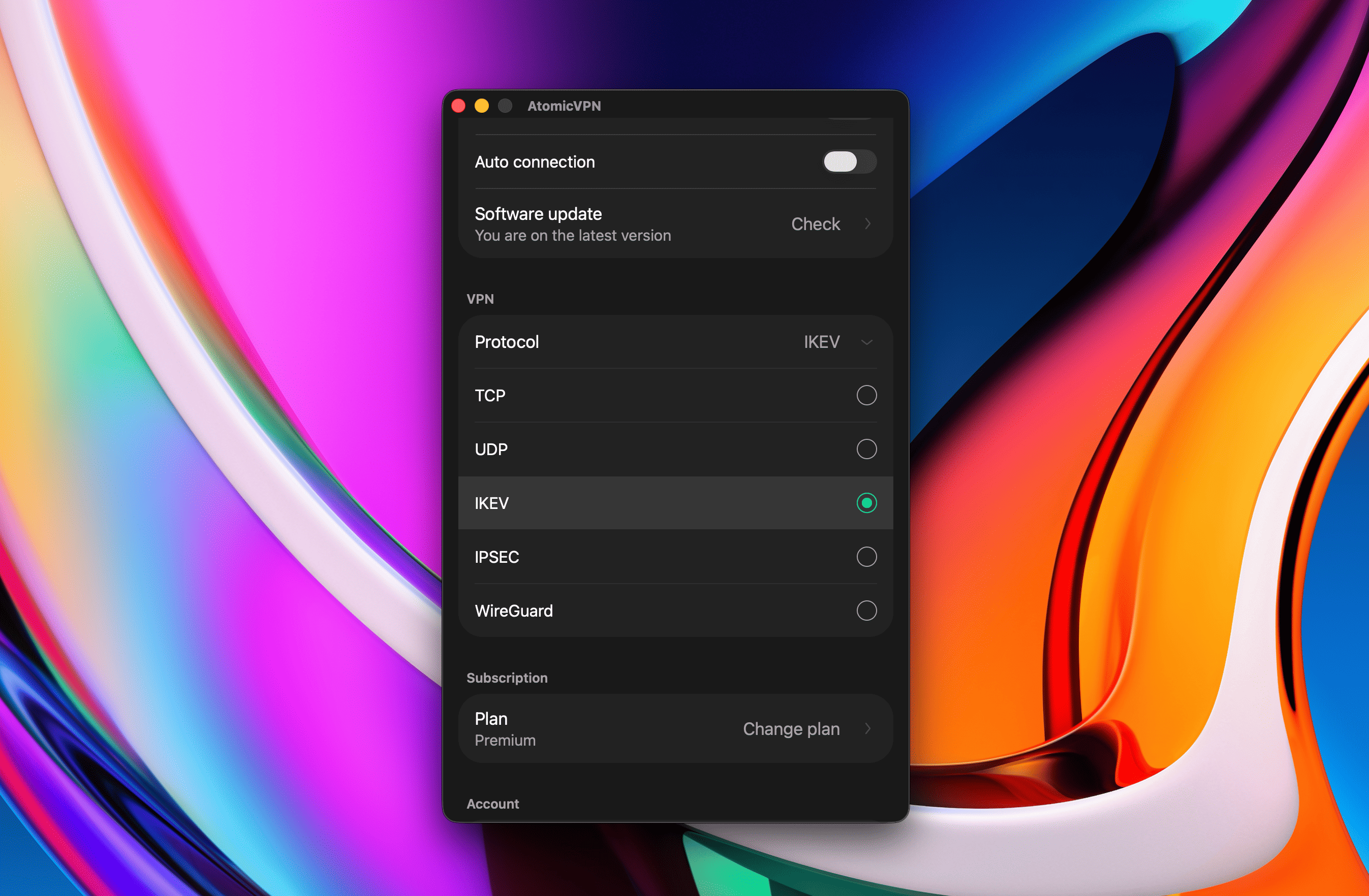
If you can't connect on a restrictive network, choose OpenVPN over TCP 443. After switching, run a DNS leak test to confirm everything goes through the tunnel, and keep the kill switch on so nothing leaks while the new tunnel comes up.
Atomic VPN protocol support
- WireGuard by default: about 890 Mbps on a 1 Gbps line, 0.2-second reconnects.
- OpenVPN over TCP 443 for networks that block VPN traffic.
- IKEv2/IPsec for native setups.
- ChaCha20-Poly1305 and AES-256 encryption.
- No activity logs, RAM-only servers, independently audited no-log policy.
- $2 a month on the yearly plan, 5 devices, 88+ countries.
Apps for Windows and macOS are available now. iOS and Android apps are on the way. See how to set up a VPN on any device, including routers.
FAQ
Is WireGuard better than OpenVPN?
For most people, yes. WireGuard is faster, uses less battery and reconnects almost instantly. OpenVPN is better on networks that block VPNs, because it can run over TCP port 443.
Is WireGuard more secure than OpenVPN?
Both are secure with current settings. WireGuard's small, fixed design leaves less room for mistakes. OpenVPN has a longer track record and more configuration options.
Why is WireGuard faster than OpenVPN?
WireGuard has a much smaller codebase, uses efficient modern cryptography, runs in the operating system kernel on Linux, and avoids OpenVPN's TLS and TCP overhead.
What is OpenVPN?
OpenVPN is an open-source VPN protocol, first released in 2001, that builds encrypted tunnels using TLS. It can run over UDP or TCP and works on almost every device.
What is an IKEv2 VPN?
An IKEv2 VPN uses the IKEv2 key exchange with IPsec encryption. It's built into iPhone, Mac, Windows and Android and handles switching between Wi-Fi and mobile data well.
What is the default WireGuard port?
UDP port 51820. VPN providers often use other ports to make WireGuard harder to block.
Is Tailscale the same as WireGuard?
No. Tailscale is a mesh networking service that uses WireGuard to connect your own devices. WireGuard is the underlying protocol.
Which VPN protocol is best for gaming?
WireGuard, because it adds the least overhead and latency. Pick a server close to you or the game server.
Which VPN protocol is best for restrictive networks?
OpenVPN over TCP port 443. It looks similar to normal HTTPS traffic, so it's hard to block without breaking regular browsing.
.webp)
.png)






